My time with NixOS
Describing my 3 year old NixOS journey.
My experience with NixOS first started in early 2023. I installed it on bare metal and I think that was the best choice that I made. A lot of people were suggesting trying it out in a virtual machine at first to get a feel for it. In my opinion, I was forced to learn way faster and it paid off. At that point, I really started liking NixOS and its declarative configuration.
I will be talking about my experience with NixOS, how I manage my dotfiles and more. Hopefully by the end you'll learn something that you didn't know yet, maybe my experience will help someone switch to NixOS and prevent some of the confusion or problems that I had.
Zenyte library
I decided to name the whole configuration zenyte,
every app and service is a module with its own options.
You can define your own options inside of these modules to
conditionally do some stuff, which is very useful if you have multiple hosts.
For example if you look at modules/apps/discord.nix
{
  config,
  pkgs,
  lib,
  default,
  ...
}:
with lib;
with lib.zenyte; let
  cfg = config.zenyte.apps.discord;
in {
  options.zenyte.apps.discord = {
    enable = mkBoolOpt false "Whether to enable discord.";
    withOpenASAR = mkBoolOpt true "Whether to enable OpenASAR, a replacement for Discord desktop's app.asar file.";
    withVencord = mkBoolOpt true "Whether to enable Vencord, a client mod for Discord.";
  };

  config = mkIf cfg.enable {
    environment.systemPackages = with pkgs; [
      (pkgs.discord.override {
        withOpenASAR = cfg.withOpenASAR;
        withVencord = cfg.withVencord;
      })
    ];

    zenyte.home.configFile = {
      "Vesktop" = "Vesktop";
      "vesktop-flags.conf" = "vesktop-flags.conf";
    };

    zenyte.matugen.template = {
      discord = {
        input = "discord.css";
        output = "~/.config/Vencord/themes/midnight-discord.css";
      };
    };
  };
}
Now inside of hosts/laptop.nix
{
  config,
  pkgs,
  lib,
  ...
}:
with lib;
with lib.zenyte; {
  # Other stuff here

  zenyte.presets = {
    common = enabled;
    development = enabled;
    social = enabled;
    gaming = enabled;
  };

  zenyte.apps = {
    vesktop = enabled;
    motrix = enabled;
    libreoffice = disabled;
    obsidian = disabled;
    transmission = enabled;
    vlc = {
      enable = true;
      enableChromecast = true;
    };
  };

  zenyte.system.locale.timeZone = "Europe/Prague";
  zenyte.system.defaultShell = pkgs.fish;

  zenyte.cli.git = {
    email = "justimnix@gmail.com";
    name = "InioX";
  };
}
You can see that discord isn't in zenyte.apps, that's because it gets
automatically enabled by the social zenyte preset.
If for some reason you wanted to disable the Vencord
integration, you can overwrite it per host. I hope that you can see why
a module system like this is pretty useful.
Managing dotfiles
The one thing that I really hated at first was Home Manager and its way of placing files into the home directory. I always like to see my changes immediately, and having to wait for my config to rebuild (which takes about 40 seconds) was very annoying for me to deal with.
That was when I learned about the mkOutOfStoreSymlink function.
It makes a symlink that isn't in the nix store, so it doesn't need to be immutable.
You can change the file and see the results immediately.
The only issue with it is that you need to provide an absolute path.
home.file = {
    ".mozilla/firefox/ini/chrome/" = {
        source = config.lib.file.mkOutOfStoreSymlink "${default.configFolder}/firefox/chrome";
        recursive = true;
    };

    ".mozilla/firefox/ini/user.js" = {
        source = config.lib.file.mkOutOfStoreSymlink "${default.configFolder}/firefox/user.js";
    };
};
I solved the absolute path issue by defining the snippet below in my flake.nix.
There is a small problem with this even after solving the absolute path problem.
You "lose" the purity and reproducibility. You don't need to think long for a
solution though, because using git to manage your dotfiles pretty much guarantees
a history you can go back on if anything goes wrong.
Another thing that can happen (and it did for me back then) is your flake not being in the right place inside of the file system. When I was reinstalling NixOS and I booted inside of the system, I noticed all of my dotfiles were missing. Then I realized that I didn't clone the dotfiles in the right place and fixed it. To prevent this in the future though, I put this in my configuration.
home.activation.createDevFolder = lib.hm.dag.entryAfter ["writeBoundary"] ''
              mkdir -p $HOME/dev/
              mkdir -p $HOME/games/
              mkdir -p $HOME/docs/notes
            '';

            # Clone dotfiles repo inside ~/dev/dotfiles
            home.activation.cloneDotfiles = lib.hm.dag.entryAfter ["writeBoundary"] ''
              baseDir="/home/${default.username}/dev/dotfiles"
              if [ ! -d "$baseDir" ]; then
                ${pkgs.git}/bin/git clone https://github.com/InioX/dotfiles "$baseDir"
              fi

              # Clone matugen-themes
              themesDir="/home/${default.username}/dev/matugen-themes"
              if [ ! -d "$themesDir" ]; then
                ${pkgs.git}/bin/git clone https://github.com/InioX/matugen-themes "$themesDir"
              fi
            '';
With the snippet above I don't have to worry about this problem at all anymore. It also sets up basic directories that I use daily.
description = "My nixos dotfiles flake";
outputs = {nixpkgs, ...} @ inputs: let
    default = {
      # https://nixos.wiki/wiki/FAQ/When_do_I_update_stateVersion
      stateVersion = "22.11";

      # Use a config folder for compatibility with arch
      flakePath = "/home/${default.username}/dev/dotfiles";
      templateFolder = "${default.flakePath}/dots/templates";
      configFolder = "${default.flakePath}/dots/config";
      localFolder = "${default.flakePath}/dots/local";
      desktopEntryFolder = "${default.flakePath}/dots/desktop-entries";
      scriptFolder = "${default.flakePath}/dots/scripts";
    }
in {}
Another useful thing is the usage of zenyte.home.configFile and zenyte.matugen.template
which are custom modules with options as well.
If the discord module isn't enabled, the matugen template won't get added,
and the config won't get symlinked. That way there
are no useless files in your ~/.config or ~.
My dotfiles are in a separate directory from the flake,
because a flake copies all of its files into the nix store.
The actual flake.nix is located in /home/${default.username}/dev/dotfiles/nixos.
Speaking of flake.nix, you can’t talk about NixOS architecture
without hitting the elephant in the room: the "experimental" Flakes...
The big controversy: Flakes
Flakes have been an experimental feature for many years now. I noticed a lot of people usually complain about their safety. I think that flakes will be used a lot until the waiting times to merge pull requests into nixpkgs change. For example look at how long this pull request has been open for. It only got merged recently and it shows the problems with nixpkgs for me.
From a developer's view, they're great. You don't have to worry about getting your
PR approved by someone. Your flake updates with your code automatically.
It is also really easy to add a devshell for your development needs.
One thing that I really like is using nix devshells with
Direnv.
It makes switching devshells really easy. All I have to do is
make a flake.nix with a devshell, then create a .envrc with the
snippet code in the root of the project.
Now the next time that I cd into the project, my devshell gets
automatically loaded and I'm ready to start coding.
use flake .From an user's view, they're even better. All of your inputs are stored in
flake.nix, and flake.lock makes sure that your config stays deterministic.
You can easily try out a program with one line.
For example you can run a formatter for nix this easily.
nix run github:kamadorueda/alejandraWhat about the security? Obviously there is a small security risk with
using flakes, but as long as you check the flake.nix of the
projects yourself then there's nothing that can go wrong.
If for some reason you really dont like flakes, check out npins.
Useful tools
nom
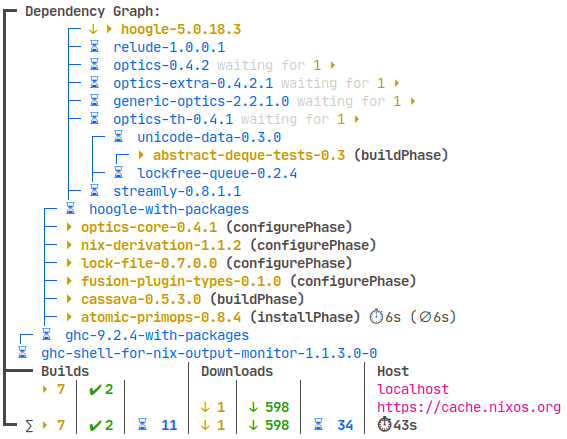
One thing that I can't imagine not using is nom. It makes my package builds and downloads much easier to go through when building my config. Trust me, it's really nice to use and looks so good. They also recently added progress bars which looks even better.
nh
Another cool thing is
nh,
it basically replaces the old nixos-rebuild command.
It is written in Rust, is faster than the original, has a faster search for packages,
and has an enhanced garbage collection command built into it which is pretty useful.
steam-config-nix
I always wanted to preserve my launch options for my games on steam. I tried writing my own scripts for extracting them from the steam config but that got too messy. This is when i found steam-config-nix and I haven't stopped using it since.
Conclusion
Three years later, NixOS is still my daily driver and it completely changed how I manage things. Sure, it has a rough learning curve and you will have to get used to the nix way of doing stuff, but being able to declare everything in your configuration makes it all worth it.